

The quickest way to delete duplicate photos on iPhone has been sitting inside the Photos app since iOS 16, and it costs nothing. Apple’s Duplicates album finds near-exact copies and merges them in a couple of taps. It genuinely works, and you should run it first. But it also has honest limits: it does nothing about similar shots, bursts, blurry photos or screenshots, and it sometimes misses resized copies. Here is how to use the built-in way well, and what to reach for when it stops.
How to delete duplicate photos on iPhone with the Duplicates album
Since iOS 16, the Photos app quietly scans your library for identical and near-identical photos and videos and collects them in a Duplicates album. It deserves real credit: it is free, private, and its Merge feature is smarter than plain deletion. Apple explains the feature in its guide to merging duplicate photos and videos on iPhone. Here is the short version.
1. Open the Duplicates album
Open Photos and scroll down to Utilities (on newer iOS versions it lives under Collections), then tap Duplicates. One catch: the album only appears once your iPhone has indexed your library and actually found something. Indexing runs while the phone is locked and on power, so if the album is missing, charge the phone overnight and look again.
2. Review each set
Each row shows the copies side by side, along with file sizes and formats. It is worth a glance before merging, mostly so you understand what you are keeping.
3. Tap Merge
Merge is the clever part. Instead of asking you to pick a copy to delete, Photos keeps the highest quality version, combines the relevant metadata from the others, and moves the leftovers to Recently Deleted. If the album has hundreds of sets, tap Select, then Merge All, and let it churn.
4. Empty Recently Deleted to get the space back
The merged copies sit in the Recently Deleted album for 30 days before iOS clears them. If you want the storage back today, open Recently Deleted and tap Delete All.
Where the Duplicates album stops
If the built-in album were the whole answer, this article would end here. It is not, and Apple never claimed otherwise. The Duplicates album is deliberately conservative: it only flags copies it is nearly certain are the same photo. That caution is good for safety and bad for coverage.
In practice, three gaps remain after a full merge. First, similar photos are untouched: the twelve almost-identical shots of the same sunset, the burst sequences, the retakes where someone blinked. To Apple these are different photos, and technically they are. To your storage they are one keeper and eleven passengers. Second, whole categories of waste are out of scope: blurry misfires, years of old screenshots, and the giant videos that dwarf everything else. Third, even within its own job it can miss resized or re-compressed copies of the same image, the kind that WhatsApp exports and cloud round trips leave behind.
So when people merge everything and then wonder why they still see doubles everywhere, nothing is broken. The built-in tool did its narrow job. The rest of the clutter simply needs a tool with wider eyes.
The thorough way: catch everything Apple misses
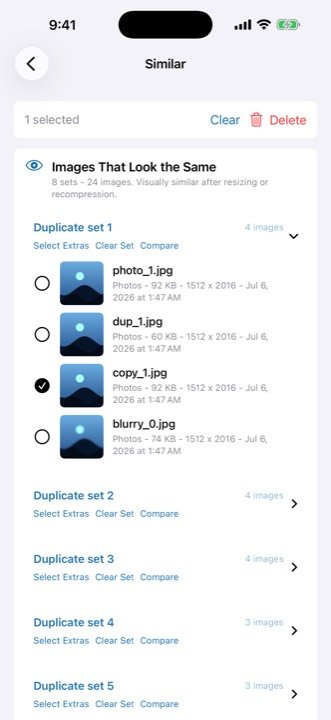
This is exactly the gap GigaBack was built for. It scans your photo library entirely on-device, with no accounts and no cloud, and your photos never leave your iPhone. Alongside exact duplicates it finds the look-alikes: similar shots and bursts grouped so you can keep the best frame, blurry photos flagged automatically, old screenshots you can clear with a swipe (left to delete, right to keep), and your largest videos ranked by size so the biggest wins come first.
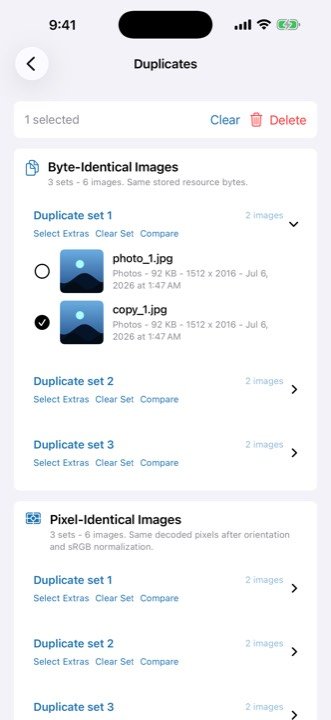
The flow is review-first, deliberately. GigaBack suggests the best photo in every group, but nothing is deleted until you say so. You work through the groups, keep the shot you love, and let the rest go. It turns “delete duplicate photos on iPhone” from a chore you dread into ten oddly satisfying minutes.
The safety net is the same one Apple uses: everything you remove goes to Photos’ Recently Deleted album, where iOS keeps it for 30 days. Nothing is unrecoverable in the moment, and nothing happens behind your back. If you are cleaning up because storage is tight, our companion guide on freeing up iPhone storage without deleting the photos you love covers the full routine, including what Apple’s other built-in tools can and cannot do.
Finish what the Duplicates album started
GigaBack finds exact and look-alike duplicates, similar and burst shots, blurry photos, old screenshots and your largest videos, entirely on-device. You review every group, and deletions stay recoverable for 30 days. Free to try. GigaBack Pro unlocks everything, with a lifetime option available.
Download on theApp StoreFrequently asked questions
Why can’t I find the Duplicates album on my iPhone?
The Duplicates album only appears after your iPhone has indexed your library and actually found duplicates. Indexing runs while the phone is locked and connected to power, so plug it in overnight and check again. If no duplicates are found, the album stays hidden.
What does Merge do in the Duplicates album?
Merge keeps the highest quality version of the photo, combines the relevant metadata from the copies, and moves the rest to Recently Deleted. You end up with one photo instead of several, and nothing is lost for 30 days.
Why do I still see near-identical photos after merging duplicates?
Apple’s Duplicates album only matches near-exact copies. Photos that are merely similar, like burst shots, retakes of the same scene, or resized copies it did not catch, are left alone. A dedicated cleaner such as GigaBack groups those too, so you can keep the best one and clear the rest.
Are merged or deleted duplicates gone forever?
No. Everything you merge or delete goes to the Recently Deleted album in Photos, where iOS keeps it for 30 days. You can recover anything in that window with a tap.